

Overview
QLive is a full-stack framework written in Java and TypeScript. The Java half is qlive, a Spring Boot library built on
DomainQL and jOOQ. The TypeScript half is @qlivedev/qlive-ts, a React library. They are two halves of one
thing, not a server and a client that happen to talk.
In a way, QLive is both big and small. The setup is pretty complex which we hope to help you over with the testing
app qlive-test and future tooling. The complexity comes from both the fullstack nature but also from the intricacies
of implementing the concepts within QLive.
The feature-set, however, focuses on a small number of features and concepts, highly adaptable to your needs and your domain.
Data Access / jOOQ
Section titled “Data Access / jOOQ”For data access we have to consider it on two levels: What we offer now and basically limitless possibilities.
We generally really like jOOQ to access databases and prefer it over industry-standard alternatives like JPA/Hibernate. jOOQ abstracts away the differences in database dialect and leads to a kind of simplicity that is both very attractive but at the same time maybe a bit bare-bones alone.
The jOOQ people will be the first to point out that jOOQ is no simple replacement for JPA. In combination with our GraphQL implementation and our QueryDocumentService we do however have a functionally a full alternative to JPA. One where the frontend developer decides how much of the object graph they need for their use case.
This is what we are currently offering. In combination with the MergeService we have a full-circle data access and update mechanism that operates on a very high, declarative level. It is plausible to write complex applications with just those two services.
Integration into QLive
Section titled “Integration into QLive”This does not bind you, however. You certainly should use our services, because, if you are not using them at all, why are you using QLive?
But you can also just do what you want. For one, QLive is fully integrated into Spring and you can do whatever. We have some controller endpoints we need for the system, but apart from those you can use whatever data communication/access/templating you like and integrate into anything.
You can also do a lot of these things within the QLive system. Everything that fits into the GraphQL method paradigm can enjoy all data injection features and/or extend them for their purposes.
POJOS as data layer
Section titled “POJOS as data layer”Every GraphQL endpoint returns a graph of POJOs. For the database-backed POJOs, the expressiveness is limited to what jOOQ generates. The handwritten POJOs which would be basis for any integration are a bit more expressive in that they can use QLive annotations to change the GraphQL type of properties and to create custom field implementations executing logic.
GraphQL is what limits the POJOs a bit, for example it does not allow typed maps or discriminator based JSON parsing.
But still, the possibilities of what can be expressed in these POJOs are endless. If you have other data sources, I’m pretty sure that you can integrate them.
GraphQL: Database/code-first
Section titled “GraphQL: Database/code-first”Our GraphQL schema is generated and the result of what is currently used. At the beginning we have a database we want to connect to. We generally support all databases supported by jOOQ.
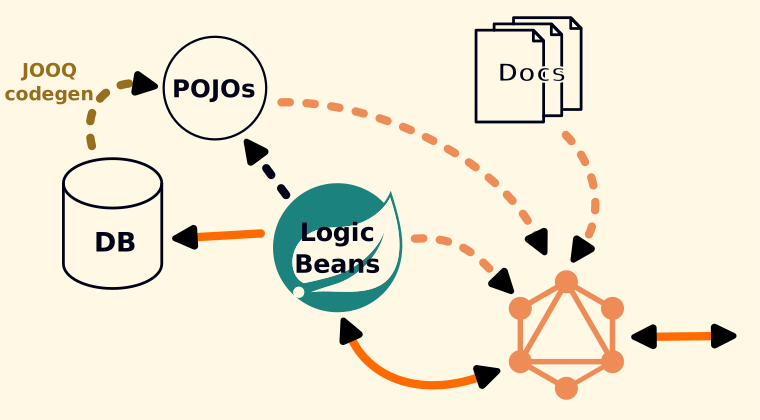
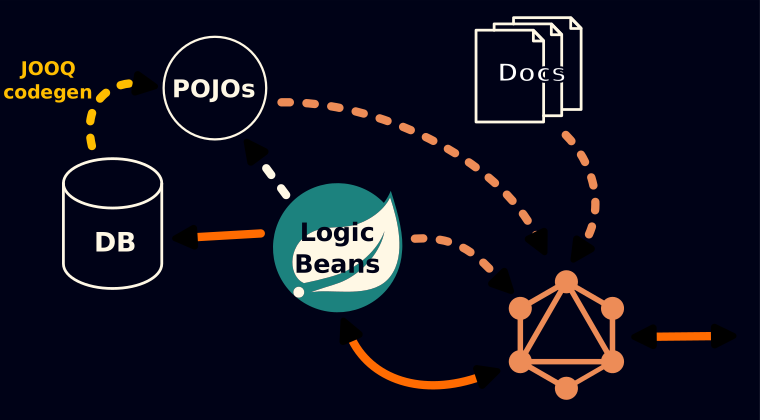
We use jOOQ to generate POJOs that mirror the tables in the database. Our GraphQL methods are contained in logic beans which can also reference handwritten POJO models. The existing GraphQL methods, all POJOS, and type documentation together build the GraphQL schema.
At runtime, GraphQL resolves our methods by their name in the schema and executes them. They in turn use jOOQ directly or through services to speak to the database. The results are fed back into GraphQL and return to the client.
Data Injection
Section titled “Data Injection”With the dominance of client side frameworks, the role of the Java server became a bit odd. We used to have complex view technologies like JSP or even JSF, but now, the server is relegated to serve files and JSON data to the client. Nothing is wrong with that per se, but it leads to data access patterns that are far from optimal.
The complexity of the domain drives up the request count needed and the async load states proliferate on the client making all components more complex than they need to be.
Of course, GraphQL alone addresses a lot of these concerns with the ability to fetch all kinds of disjointed queries in one go. Instead, we decided to go another way and invented GraphQL data injection.
Using data injection on the client
Section titled “Using data injection on the client”Using data injection on the client couldn’t be easier. We just declare that we want to use an injection of the named query Q_Foo and the system’s static analysis tracks all those declarations and provides the data at runtime before the HTML view is even sent to the client.
export default function Home() { const foos = useInjection(Q_Foo); // ...}From the client’s perspective, the data is just there without any fetch or useEffect or anything.
How it works
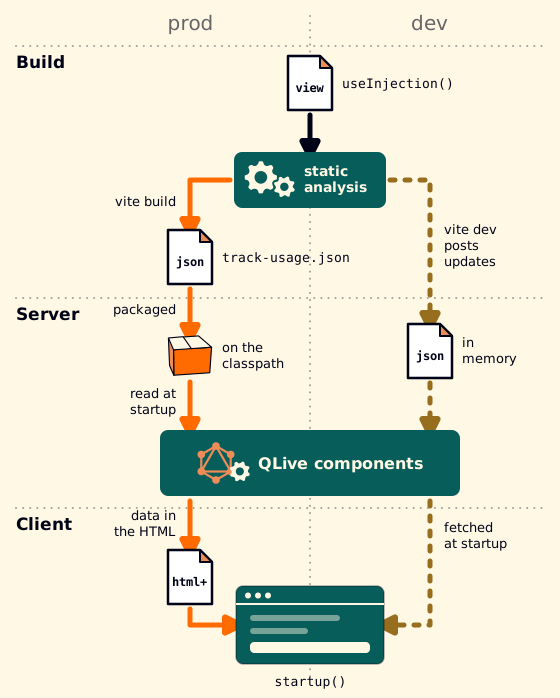
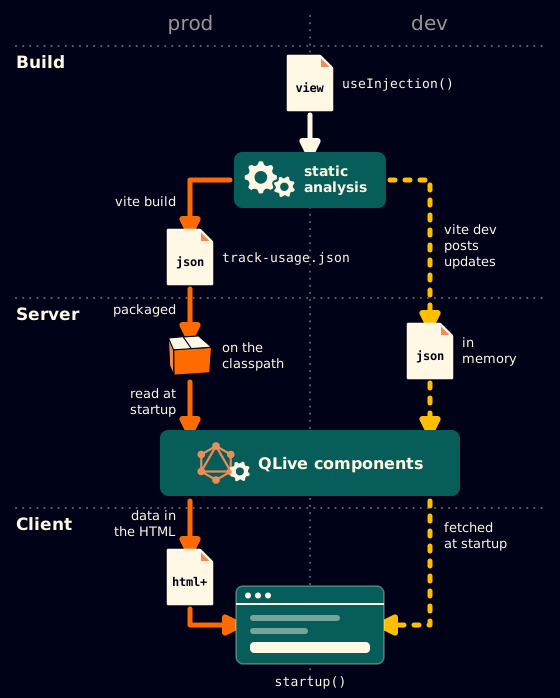
Section titled “How it works”The frontend build analyzes that call statically and records it. The server reads that analysis, so by the time a request for the page arrives it already knows which queries that page runs. It runs them and ships the results inside the HTML document. The page arrives with its data in it; nothing fetches anything for the first render.
That is the central trade of the framework. What it buys is a page that is
complete when it paints. What it costs is a constraint: a useInjection()
call has to be readable at build time. See
Injections for what that rules out.
How a page is served
Section titled “How a page is served”In production, ViteIndexController serves the built index.html for
any route below the Vite base. VitePageRenderer splices the bootstrap
data – config, CSRF token, and the injections for that path – into the
empty #root-data placeholder script tag the template carries.
startup() reads it out of the document.
In vite dev, nobody touches that placeholder: the dev server serves
its own index.html. The placeholder stays empty, and startup() falls
back to fetching the same data from /api/bootstrap?path=.... The page
boots identically either way; only where the bootstrap came from differs.
The static analysis reaches the server by two different routes for the same reason:
| production | vite dev |
|
|---|---|---|
| Analysis | track-usage.json written by vite build, read off the classpath |
POSTed to /_dev/track-usage by the Vite plugin as you edit, one save’s changed modules at a time |
| Provider bean | ProdStaticAnalysisProvider |
DevStaticAnalysisProvider |
| Missing analysis | fails at startup – a build error | answers “not ready”; the frontend retries |
Consumers never see the difference: both are StaticAnalysisProvider.
What the server knows about the frontend
Section titled “What the server knows about the frontend”Three things, and they are worth naming because they are the seams:
- Which module serves a path. Derived from the analysis and from the path conventions in qlive-test layout.
- Which queries that module injects, and with what parameters.
Recorded by the build’s track-usage analysis from the
useInjection()call itself. - Whether that module declared
noSchema(). Decides whether the page gets the full GraphQL schema or a reduced bootstrap.
Nothing else. In particular the server never sees your components, only the entry point or view a request resolves to.
The dev loop
Section titled “The dev loop”pnpm dev runs the Spring Boot backend and the Vite dev server together.
On top of the usual HMR, we’re updating the server about current state of the Typescript sources.
All the functionality relying on static analysis is provided with fresh data.
If you edit a module holding a GraphQLQuery the system corrects the correct Typescript type back into your source file.
The next view you invoke will correctly reflect the new data selection.
See Generated artifacts.